| Current | Previously... | Archives | About |
The IKEA Myggbett contact sensor is getting a lot of attention among home automation enthusiasts, not just for its Matter-over-Thread support, but for its ground-breaking low price. I couldn't resist picking one up.
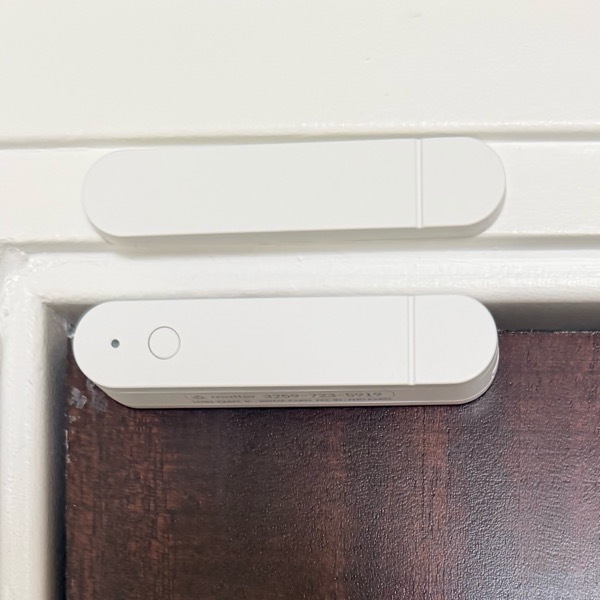
Adding it to HomeKit was a breeze, but the design of the sensor prevented it from being mounted on my door in the manner illustrated in the IKEA instructions. (And of course it was illustrated! I love their instructional design.)
I did eventually find a single way to position both pieces in a way that works and fits my door's frame. Note the relative positions of the button and detent in the photo below. And be sure to test that the distance between the pieces activates the sensor, before you mount them into place.
I'm finding that the sensor reacts quickly, but I'm also getting several spurious signals every day. I suspect that it's because I don't have a Thread border router device to receive the battery-powered sensor's signals. (In other words, my Thread mesh consists of just this one device.) I'll add another Mater-over-Thread device and see if that resolves the problem. Nonetheless, given the low cost of this sensor, I'm mostly satisfied, and I'll explore other devices in the IKEA range as I discover uses for them.
I have previously written about products from SwitchBot, and I remain a big fan of their robotic fingers, but their relatively new Candle Warmer Lamp needs a lot of work in the usability department.
Physically, the device is fine. It's essentially a lamp that melts a scented candle using the heat of a halogen bulb. The design is minimalist, but functional. All the "smart" controls are housed in a mid-cord dongle that also provides manual control of the device.
But the SwitchBot app that controls the candle warmer is a disaster. I wanted the device to turn itself off after a programmed number of minutes, and I simply could not figure out how that was accomplished in the byzantine-like app.
(And for those of you new here, I am no stranger to smart home programming.)
I reached out to SwitchBot tech support, asking if such a thing was even possible, and days later I received a reply that, while accurate, was vague and presumptive.
Fortunately, by the time they replied, I had figured out a workaround that accomplishes what I want.
In the automation tab of the app, I defined a Candle Warmer automation with a "When" trigger of the lamp being turned on.
The "Perform" sequence of the automation is:
I know, this seems like a no-brainer. But unless you've used the SwitchBot app, you can't appreciate how difficult they make this.
The automation is triggered when I press the power button on the lamp's cord. Presumably it would also be triggered by an automated action that turned on the lamp, but I haven't tried that.
The brightness level refers to the halogen bulb in the device. This determines how quickly it melts the scented wax. This setting is my preference, and I've included it in the automation to ensure it's set exactly as I want it to be.
I'm using the 10-minute "After" timer action. There is a "Delay" action available in the app too, but I cannot get it to function as I expect it to work. (And it was the option that tech support mentioned to me.)
I am using this as a triggered automation based on the device being turned on. The reason is that I don't believe (nor recommend) that devices like this should be put under full automatic control. This automation provides a bit of a safety net by limiting the device's runtime if it is turned on accidentally, either by an errant signal, or human error.
The Zio heart monitor is a remarkable device, and while it is resistant to water, the manufacturer says that you have to avoid getting it wet in the shower. Which, given its placement on your chest, isn't a very realistic piece of advice.
Here's a way to take a shower without resorting to physics-defining contortions.
Buy a package of large Tegaderm Transparent Dressings, made by 3M. They're not cheap, but they're waterproof and, if you buy the 6" x 8" size, big enough to over the entire monitor and its nodes. But, very importantly, fold a paper towel and cover the Zio entirely before placing the bandage over it. This protects the monitor from the extreme stickiness of the bandage.
Unless you have experience with Tegaderm bandages, you'll probably need some assistance putting it on.
Next, shower as usual. When you remove the bandage after toweling yourself off, marvel at how perfectly dry it is inside.
On Thanksgiving Day, we went for a walk on Chicago's Riverwalk. It was lovely. We found this postcard on the sidewalk. (As many of my friends know, I love a good postcard.)

The postcard is from the top of the Sears Tower, and it has a link to the photo taken of the people who visited, and then lost the card.

We did see these guys during our walk, but didn't make the association to return it to them. We hope they had a nice visit anyway.
(The shark sticker on the card is something I added before mailing it to a friend.)