| Recently... | Previously... | Archives | About |
It's a sad day here. My "everyday-carry" bag has died. This "man bag" (or "murse") has served me well in probably twenty countries, thousands of miles of travel, and just over seven years.
I rather like the patina and signs of use it has developed.
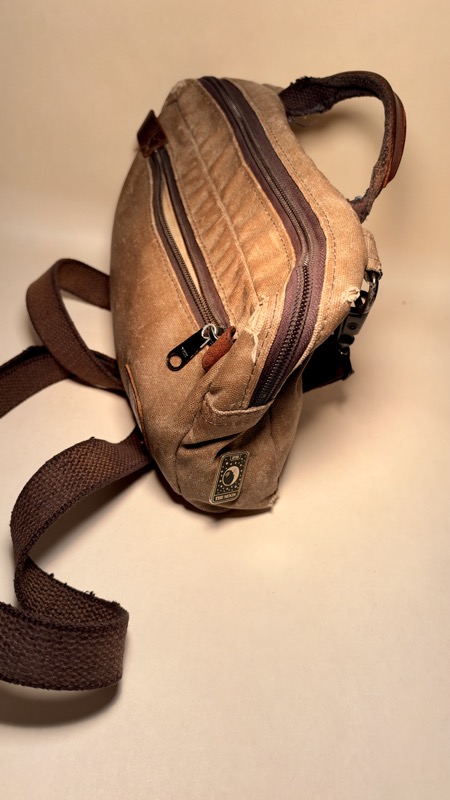
I enthused about the bag during the before-times, shortly after I adopted it as you can read in my EDC bag review: "Check out my Nutsac." Presciently I mentioned the zippers. And it was a failure of the front zipper, after countless openings, that proved fatal.
I have replaced it with a new "Man-Bag, Damnit" (as Nutsac calls this model) that is a slightly different color, and sadly omits the "Nutsac" wordmark on the front. I suppose they chickened out in that regard.
The bag is available at the Nutsac website, and I still recommend it. It's not currently available on their Amazon storefront, but check there too.
Ikea's very inexpensive Timmerflotte temperature sensor, which supports Matter over Thread, is very difficult to resist. It's slim, stylish, and has a pleasing on-demand LED display. Unfortunately, in its current form, it's severely flawed.
The issue is that it frequently drops offline. The only way to revive it, if you're lucky enough to have physical access to the sensor, is to remove the batteries for several minutes.
To date, Ikea has not released a firmware update to address this issue. But when they do, you should be able to update it via Apple Home, as in the postscript to this post describes.
When I was growing up, a neighbor had a police radio scanner that provided endless hours of amusement and audio voyeurism. (My neighbor was also a ham radio hobbyist and enjoyed pranking neighbors by using his radios to operate their garage doors.)
I recently decided that a radio scanner could be interesting for monitoring the heavy traffic on a nearby river. So I bought a Uniden Bearcat BC125AT Handheld Scanner from Amazon.
Boy, was that a mistake! It's easily the most frustrating and poorly documented electronic device that I've ever owned.
First, the Owners (sic) Manual is littered with acronyms and technical terms that are never properly defined or contextualized. (Aside: Bad tech writers will tell you what an acronym stands for, but not why you should care.)
The manual begins with 30 pages of tables and button identifiers before even attempting to describe how to use the product. (Which, ultimately, it fails to do for first-time users.) These tables include such useless information as defining that the keypad buttons labeled 1 through 9 are used to enter the numbers 1 through 9 - with each button being described individually. (I'm not kidding.)
There are also four pages of instructions about how to install, replace and charge the batteries. The number and size of the batteries are never mentioned. (It uses two AA batteries, which to Uniden's credit, are included in the box.)
One of the reasons I chose this scanner is that it comes pre-programmed with groups of common frequencies, such as those used for "Marine" or "Fire." However, out of the box, these groups are locked from use. The instructions for unlocking the blocks of channels are four pages long, and ultimately, don't work. (It's not just me; many reviews on Amazon mention this too.)
I feel bad for the manual's writer when much of the problem rests squarely with the designers and engineers of the product. (Although I suspect that the engineer and writer are the same person, which would explain a lot. And I doubt very much that Uniden has a user experience designer on staff.)
The main usability issue with the Uniden Bearcat BC125AT is that each of the 17 buttons on the face of the device has at least two functions. There is a "func" key to access the button's secondary mode, but in a few cases, you also have to hold down a button for 3 seconds to activate yet another mode.
Even the rotating knob on the top has three different functions, depending on whether it is turned, pushed, or held down.
The result is a usability nightmare.
If you're looking for a radio scanner that you can use, and one that you won't want to throw out the window, don't buy this one.
Oh man, did I enjoy this "choose your own adventure" (COYA) book. If you're a regular reader, you may recall my previous reviews in this genre, but this new volume is the best one yet.
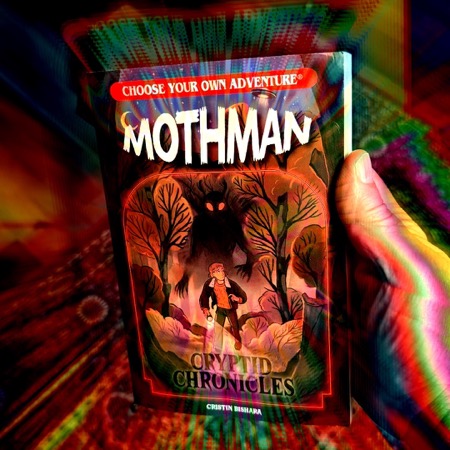
Yes, it's a new volume. The publisher, Chooseco, is once again adding new books to the venerable series. This one was released in 2025 and is written by Cristin Bishara (with illustrations by Sofia Cavallari.)
If you're also a fan of COYA books, you'll love this one. It's finely crafted, well-plotted, and deeply researched. That last assertion might surprise you given the subject, but I'm very familiar with Mothman, and Bishara has woven in details from the legend and West Virginia, in ways that will tickle anyone who is in the know. She has even accounted for the ongoing sightings in additional locations. And, to my delight, mentions the Mothman cookies you can get on Main Street in Point Pleasant. (They're charming and delicious, by the way.) But none of this insider knowledge is necessary to enjoy the book. You won't feel lost if this is your first "encounter" with the legend.
By the way, here's a photo of me from a recent snowy visit to the World's Only Mothman Museum, so please grant me at least a little cred in this regard.

The book has nineteen different endings, and I found each of them interesting and satisfying. I'm usually not a completest in this regard, but as I said, I was really digging the story. (For tips on exploring different branches in COYA books, see my review of Dungeon Crawl at the Haunted Mall.)
You can buy a copy of Mothman Cryptid Chronicles at the Amazon. And it's a safe bet that I'll soon be reading Bishara's next book in the series, Chupacabra.
P.S. If you'd like to hear the story of the Chicago Mothman check out my Bizarre Bucktown video walking tour.